
Scams cross devices. So does  .
.
A scam starts as a text on your phone and finishes on your laptop. HARD guards every screen it lands on.
-
Scam text filter
Tue 8:14 pm: a text about a new HSBC payee. HARD reads it on your iPhone and files it in Junk. It never leaves the phone.
8:147:40Junk
(202) 555-01478:14 PM HSBC: A new payee was added to your account today. If this wasn’t you, secure your account now at hsbc-verify-account.comNo Messages
Search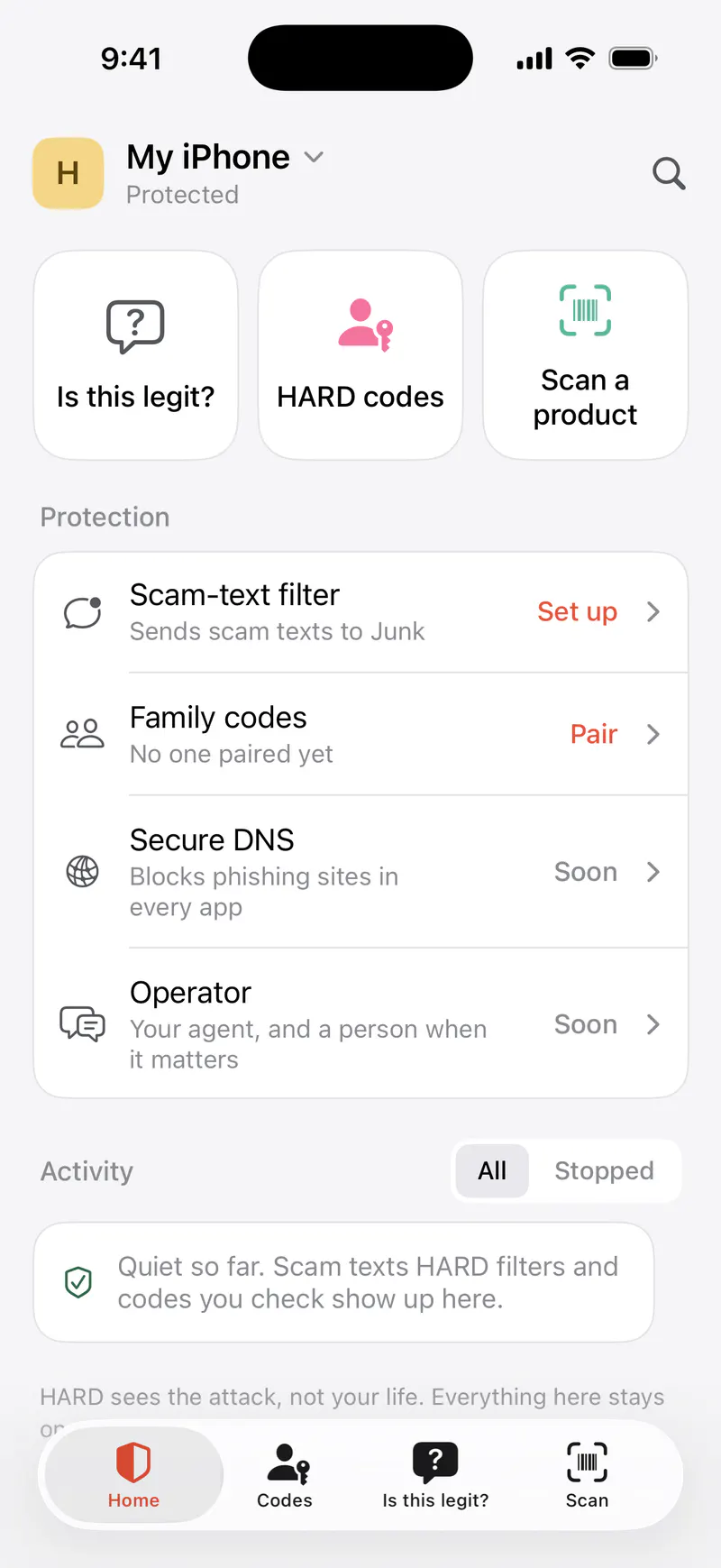
 (212) 555-0182mobile0:41Do they say they’re family or a friend on a new or borrowed number?Did they call you, rather than you calling them?
This looks like a scam.
Banks never ask you to move money to keep it safe.
Any call that ends in moving money needs a second check.
These are who scammers pretend to be.
You can’t verify who’s calling you.
What to do
1Say: “I’ll call you back,” and hang up. You don’t need to be polite to a scammer.
2Call back on a number you find yourself: the back of your card, the company’s website, or the number you have saved for them.
3If they claim to be family, ask for their HARD code.
7:52Is this legit?
HomeCodesIs this legit?ScanThursday, October 22
7:58
Sam (HARD Engineer)now
Sam here, your HARD engineer. HARD stopped a fake HSBC site on your Mac at 7:40. If anyone rings about it, hang up and call the number on the back of your card.
-
Fake site protection
Thu 7:40 am: the same link, opened in Chrome. HARD stops the fake HSBC page before it loads, so nothing is sent to it.
FinderFileEditViewGoWindowHelpChromeFileEditViewHistoryBookmarksProfilesHARDFileEditViewWindowHelp Tue Oct 20 8:14 PMThu Oct 22 7:40 AMThu Oct 22 7:52 AMThu Oct 22 7:58 AMhsbc-verify-account.comhsbc-verify-account.com/secure Not HSBC: stopped by HARDHARDchrome-extension://…/warning.htmlLog on to Online Bankingaccount-review-center.com/logon
This isn’t HSBC.
Uses HSBC’s name next to words like “login” or “verify”, on a site HSBC doesn’t own (hsbc-verify-account.com).
Addresshsbc-verify-account.com
Go to the real HSBCGo backI know this site, open itHARD stopped this page before it loaded. Nothing was sent to it.
Log on to Online Banking
Usernamej.taylor Password•••••••••• ContinueHARD
That was your HSBC password.
You typed it into account-review-center.com, which isn’t HSBC. HARD cleared it before it could be sent. If you’d already pressed Enter or a button, change your HSBC password now.
Change my HSBC passwordLeave this siteI know this site
Stopped you opening hsbc-verify-account.comnow
Uses HSBC’s name next to words like “login” or “verify”, on a site HSBC doesn’t own (hsbc-verify-account.com).
MacBook AirProtectedSearch- Home
- Is this legit?
- HARD codes
- Ask HARD
- Protection
- Live
- Firewall and DNS
- Wi-Fi devices
- Checks
- Updates
- Apps
- Background items
- Browser extensions
- Network
- This Mac
Checked 2 min. agoCheck again
Ask HARDHARD’s agent answers straight away. A person steps in when it matters.
Ask a person
Sam here, your HARD engineer. HARD stopped a fake HSBC site on your Mac at 7:40. If anyone rings about it, hang up and call the number on the back of your card.
7:58 AMMessage HARD…AddSendHARD’s agent uses Claude, so messages and screenshots go to Anthropic. Never send passwords or one-time codes.
-
Browser alerts
The extension tells HARD for Mac over the browser’s own channel, never the internet. Your Mac keeps the record.
FinderFileEditViewGoWindowHelpChromeFileEditViewHistoryBookmarksProfilesHARDFileEditViewWindowHelp Tue Oct 20 8:14 PMThu Oct 22 7:40 AMThu Oct 22 7:52 AMThu Oct 22 7:58 AMhsbc-verify-account.comhsbc-verify-account.com/secureNot HSBC: stopped by HARDHARDchrome-extension://…/warning.htmlLog on to Online Bankingaccount-review-center.com/logon
This isn’t HSBC.
Uses HSBC’s name next to words like “login” or “verify”, on a site HSBC doesn’t own (hsbc-verify-account.com).
Addresshsbc-verify-account.com
Go to the real HSBCGo backI know this site, open itHARD stopped this page before it loaded. Nothing was sent to it.
Log on to Online Banking
Usernamej.taylor Password•••••••••• ContinueHARD
That was your HSBC password.
You typed it into account-review-center.com, which isn’t HSBC. HARD cleared it before it could be sent. If you’d already pressed Enter or a button, change your HSBC password now.
Change my HSBC passwordLeave this siteI know this site
Stopped you opening hsbc-verify-account.comnow
Uses HSBC’s name next to words like “login” or “verify”, on a site HSBC doesn’t own (hsbc-verify-account.com).
MacBook AirProtectedSearch- Home
- Is this legit?
- HARD codes
- Ask HARD
- Protection
- Live
- Firewall and DNS
- Wi-Fi devices
- Checks
- Updates
- Apps
- Background items
- Browser extensions
- Network
- This Mac
Checked 2 min. agoCheck again
Ask HARDHARD’s agent answers straight away. A person steps in when it matters.
Ask a person
Sam here, your HARD engineer. HARD stopped a fake HSBC site on your Mac at 7:40. If anyone rings about it, hang up and call the number on the back of your card.
7:58 AMMessage HARD…AddSendHARD’s agent uses Claude, so messages and screenshots go to Anthropic. Never send passwords or one-time codes.
-
Password alert
If a fake page did load, HARD clears your HSBC password as you type it there, before the page can send it.
FinderFileEditViewGoWindowHelpChromeFileEditViewHistoryBookmarksProfilesHARDFileEditViewWindowHelp Tue Oct 20 8:14 PMThu Oct 22 7:40 AMThu Oct 22 7:52 AMThu Oct 22 7:58 AMhsbc-verify-account.comhsbc-verify-account.com/secureNot HSBC: stopped by HARDHARDchrome-extension://…/warning.htmlLog on to Online Bankingaccount-review-center.com/logon
This isn’t HSBC.
Uses HSBC’s name next to words like “login” or “verify”, on a site HSBC doesn’t own (hsbc-verify-account.com).
Addresshsbc-verify-account.com
Go to the real HSBCGo backI know this site, open itHARD stopped this page before it loaded. Nothing was sent to it.
Log on to Online Banking
Usernamej.taylor Password•••••••••• ContinueHARD
That was your HSBC password.
You typed it into account-review-center.com, which isn’t HSBC. HARD cleared it before it could be sent. If you’d already pressed Enter or a button, change your HSBC password now.
Change my HSBC passwordLeave this siteI know this site
Stopped you opening hsbc-verify-account.comnow
Uses HSBC’s name next to words like “login” or “verify”, on a site HSBC doesn’t own (hsbc-verify-account.com).
MacBook AirProtectedSearch- Home
- Is this legit?
- HARD codes
- Ask HARD
- Protection
- Live
- Firewall and DNS
- Wi-Fi devices
- Checks
- Updates
- Apps
- Background items
- Browser extensions
- Network
- This Mac
Checked 2 min. agoCheck again
Ask HARDHARD’s agent answers straight away. A person steps in when it matters.
Ask a person
Sam here, your HARD engineer. HARD stopped a fake HSBC site on your Mac at 7:40. If anyone rings about it, hang up and call the number on the back of your card.
7:58 AMMessage HARD…AddSendHARD’s agent uses Claude, so messages and screenshots go to Anthropic. Never send passwords or one-time codes.
-
Is this legit?
Thu 7:52 am: “the fraud team” calls. Choose I’m on a call, answer while they talk, and HARD tells you to hang up.
8:147:40Junk
(202) 555-01478:14 PM HSBC: A new payee was added to your account today. If this wasn’t you, secure your account now at hsbc-verify-account.comNo Messages
Search
(212) 555-0182mobile0:41Do they say they’re family or a friend on a new or borrowed number?Did they call you, rather than you calling them?This looks like a scam.
Banks never ask you to move money to keep it safe.
Any call that ends in moving money needs a second check.
These are who scammers pretend to be.
You can’t verify who’s calling you.
What to do
1Say: “I’ll call you back,” and hang up. You don’t need to be polite to a scammer.
2Call back on a number you find yourself: the back of your card, the company’s website, or the number you have saved for them.
3If they claim to be family, ask for their HARD code.
7:52Is this legit?
HomeCodesIs this legit?ScanThursday, October 22
7:58
Sam (HARD Engineer)now
Sam here, your HARD engineer. HARD stopped a fake HSBC site on your Mac at 7:40. If anyone rings about it, hang up and call the number on the back of your card.
-
Engineer
Your engineer sees what HARD stopped on your Mac. Never the text: that never left your phone.
8:147:40Junk
(202) 555-01478:14 PM HSBC: A new payee was added to your account today. If this wasn’t you, secure your account now at hsbc-verify-account.comNo Messages
Search
(212) 555-0182mobile0:41Do they say they’re family or a friend on a new or borrowed number?Did they call you, rather than you calling them?This looks like a scam.
Banks never ask you to move money to keep it safe.
Any call that ends in moving money needs a second check.
These are who scammers pretend to be.
You can’t verify who’s calling you.
What to do
1Say: “I’ll call you back,” and hang up. You don’t need to be polite to a scammer.
2Call back on a number you find yourself: the back of your card, the company’s website, or the number you have saved for them.
3If they claim to be family, ask for their HARD code.
7:52Is this legit?
HomeCodesIs this legit?ScanThursday, October 22
7:58
Sam (HARD Engineer)now
Sam here, your HARD engineer. HARD stopped a fake HSBC site on your Mac at 7:40. If anyone rings about it, hang up and call the number on the back of your card.
FinderFileEditViewGoWindowHelpChromeFileEditViewHistoryBookmarksProfilesHARDFileEditViewWindowHelp Tue Oct 20 8:14 PMThu Oct 22 7:40 AMThu Oct 22 7:52 AMThu Oct 22 7:58 AMhsbc-verify-account.comhsbc-verify-account.com/secureNot HSBC: stopped by HARDHARDchrome-extension://…/warning.htmlLog on to Online Bankingaccount-review-center.com/logon
This isn’t HSBC.
Uses HSBC’s name next to words like “login” or “verify”, on a site HSBC doesn’t own (hsbc-verify-account.com).
Addresshsbc-verify-account.com
Go to the real HSBCGo backI know this site, open itHARD stopped this page before it loaded. Nothing was sent to it.
Log on to Online Banking
Usernamej.taylor Password•••••••••• ContinueHARD
That was your HSBC password.
You typed it into account-review-center.com, which isn’t HSBC. HARD cleared it before it could be sent. If you’d already pressed Enter or a button, change your HSBC password now.
Change my HSBC passwordLeave this siteI know this site
Stopped you opening hsbc-verify-account.comnow
Uses HSBC’s name next to words like “login” or “verify”, on a site HSBC doesn’t own (hsbc-verify-account.com).
MacBook AirProtectedSearch- Home
- Is this legit?
- HARD codes
- Ask HARD
- Protection
- Live
- Firewall and DNS
- Wi-Fi devices
- Checks
- Updates
- Apps
- Background items
- Browser extensions
- Network
- This Mac
Checked 2 min. agoCheck again
Ask HARDHARD’s agent answers straight away. A person steps in when it matters.
Ask a person
Sam here, your HARD engineer. HARD stopped a fake HSBC site on your Mac at 7:40. If anyone rings about it, hang up and call the number on the back of your card.
7:58 AMMessage HARD…AddSendHARD’s agent uses Claude, so messages and screenshots go to Anthropic. Never send passwords or one-time codes.
Junk
No Messages
This looks like a scam.
Banks never ask you to move money to keep it safe.
Any call that ends in moving money needs a second check.
These are who scammers pretend to be.
You can’t verify who’s calling you.
What to do
1Say: “I’ll call you back,” and hang up. You don’t need to be polite to a scammer.
2Call back on a number you find yourself: the back of your card, the company’s website, or the number you have saved for them.
3If they claim to be family, ask for their HARD code.
Is this legit?
Thursday, October 22
7:58
Sam (HARD Engineer)now
Sam here, your HARD engineer. HARD stopped a fake HSBC site on your Mac at 7:40. If anyone rings about it, hang up and call the number on the back of your card.
 Not HSBC: stopped by HARD
This isn’t HSBC.
Uses HSBC’s name next to words like “login” or “verify”, on a site HSBC doesn’t own (hsbc-verify-account.com).
Addresshsbc-verify-account.com
HARD stopped this page before it loaded. Nothing was sent to it.
Log on to Online Banking
Usernamej.taylor Password•••••••••• ContinueHARD
That was your HSBC password.
You typed it into account-review-center.com, which isn’t HSBC. HARD cleared it before it could be sent. If you’d already pressed Enter or a button, change your HSBC password now.
Stopped you opening hsbc-verify-account.comnow
Uses HSBC’s name next to words like “login” or “verify”, on a site HSBC doesn’t own (hsbc-verify-account.com).
- Home
- Is this legit?
- HARD codes
- Ask HARD
- Protection
- Live
- Firewall and DNS
- Wi-Fi devices
- Checks
- Updates
- Apps
- Background items
- Browser extensions
- Network
- This Mac
Ask HARDHARD’s agent answers straight away. A person steps in when it matters.
Ask a person
Sam here, your HARD engineer. HARD stopped a fake HSBC site on your Mac at 7:40. If anyone rings about it, hang up and call the number on the back of your card.
7:58 AMHARD’s agent uses Claude, so messages and screenshots go to Anthropic. Never send passwords or one-time codes.
Three tries, three screens. Nothing sent.
-
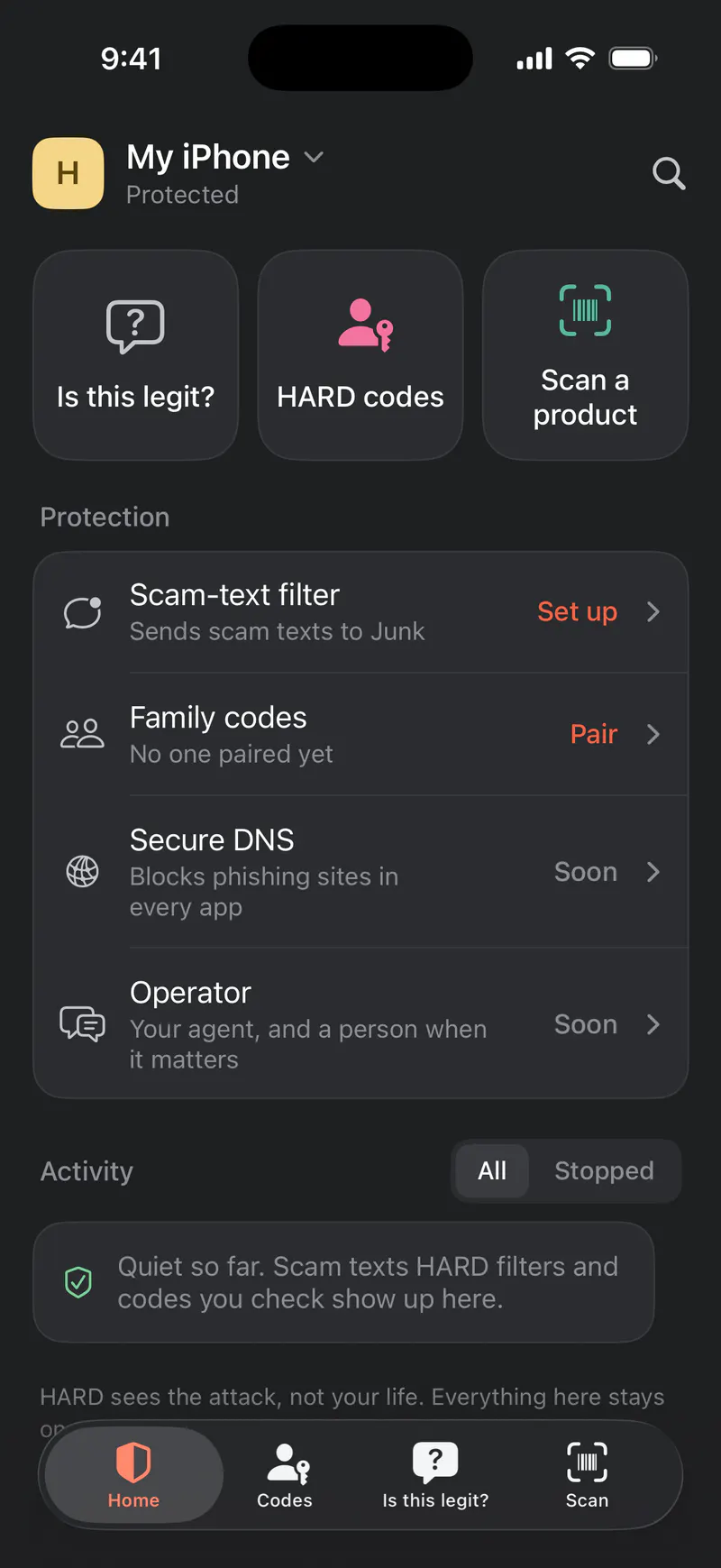
HARD for iPhone
Guards your texts and calls.
Never sees your contacts’ texts, and nothing it reads leaves the phone.
-
Not HSBC: stopped by HARDHARDchrome-extension://…/warning.html
This isn’t HSBC.
Uses HSBC’s name next to words like “login” or “verify”, on a site HSBC doesn’t own (hsbc-verify-account.com).
Addresshsbc-verify-account.com
Go to the real HSBCGo backI know this site, open itHARD stopped this page before it loaded. Nothing was sent to it.
HARD for Chrome and Brave
Guards every site you open.
Never keeps your passwords, only scrambled fingerprints of them.
-
HARDFileEditViewWindowHelp Thu Oct 22 9:41 AM
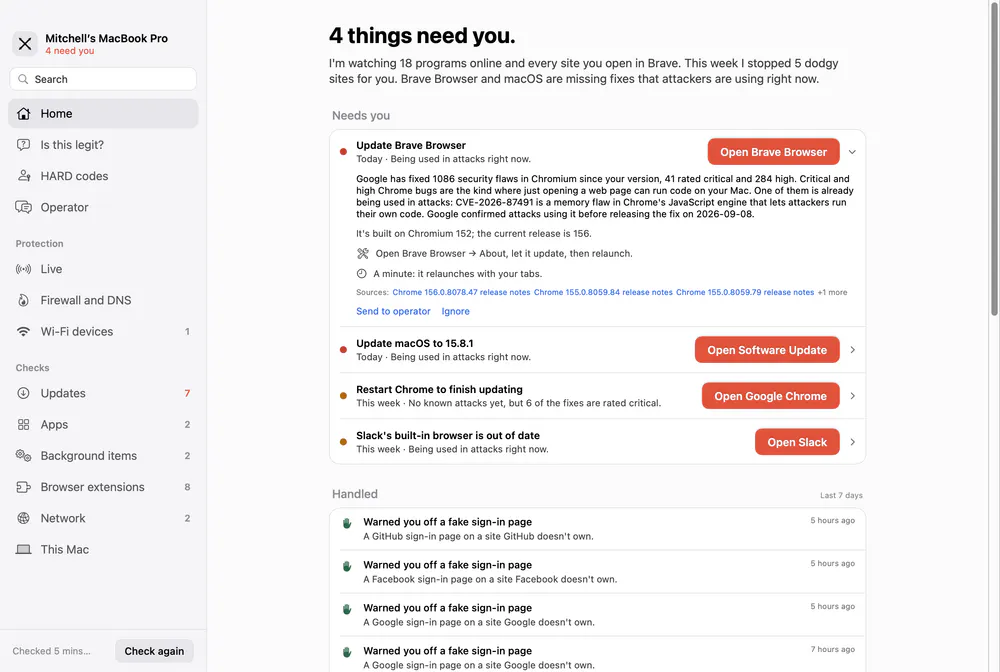
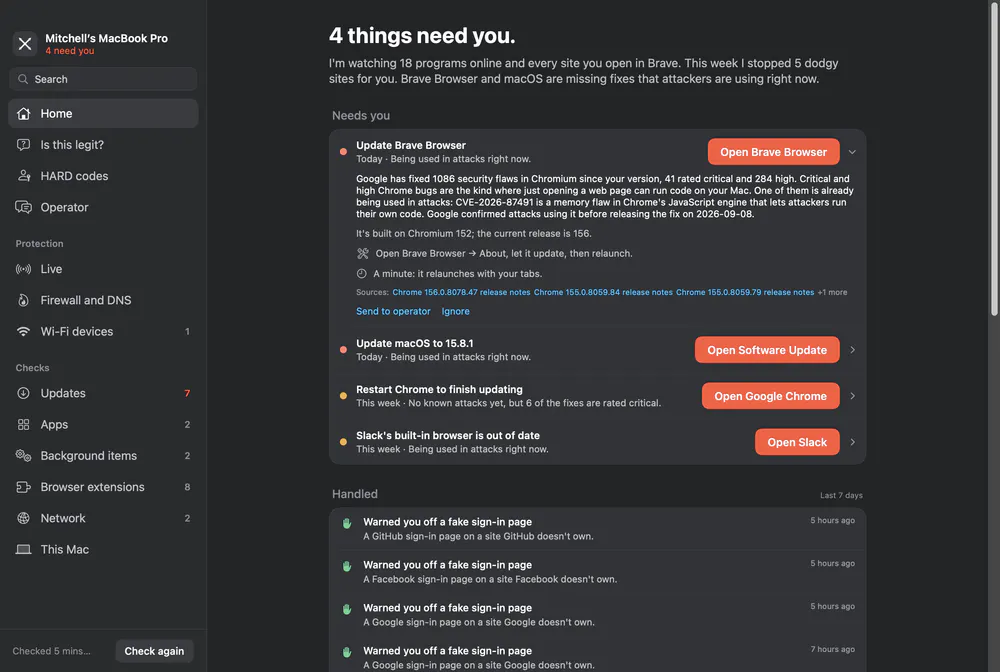
HARD for Mac
Guards the Mac itself, and keeps the record.
Never reads what your apps send, only who they talk to.
One lookalike detector in every guard, and one set of scam rules on your Mac and iPhone.
account
End-to-end encryption
On every plan. Your devices share what they find through one account, and HARD’s servers hold nothing they can open. How we keep it private
Managed accounts
On Family. Run HARD for the parents you look after: the alerts that matter on Mum’s Mac and iPhone reach you too. How it works for parents
ComingHARD DNS, Android and Windows.